Your prompts, minus the customer data.
Cloakshot Prompt masks emails, phone numbers, card numbers, IDs, API keys and client names before they reach ChatGPT, Claude, Gemini or Copilot. The assistant still understands the request. It just never sees the real values.
Chrome, Edge and Brave. No account, no proxy, no server. Everything runs in your browser.
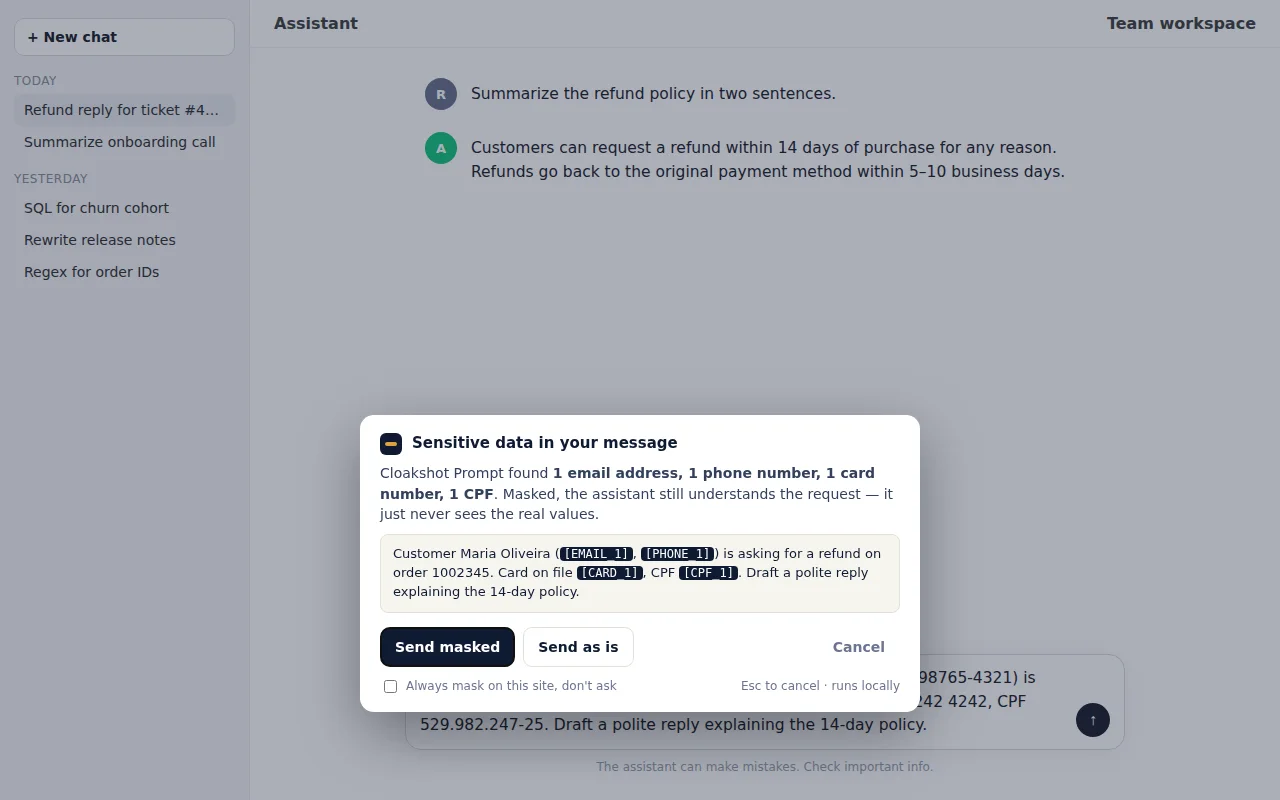
Most companies have already leaked data through an AI tool
54% of organizations reported an AI-related data leak in 2025, and a third of all data exfiltration now goes through AI tools (LayerX, Enterprise AI & SaaS Data Security Report 2025). Support agents paste tickets. Developers paste logs. Finance pastes spreadsheets. The assistant only needs the shape of the data, not the values — so that's all it gets.
Detects the risky stuff automatically
Pattern matching with real validation: Luhn for cards, check digits for CPF/CNPJ, mod‑97 for IBAN, the key formats of the major cloud, payment and AI platforms, JWTs, bearer tokens and password= style secrets.
Placeholders the model understands
[EMAIL_1] [CARD_1] [NAME_2] keep the structure of your text. The same value always gets the same placeholder, so a whole conversation stays coherent. Copy the answer and the originals come back.
Nothing leaves your browser
No accounts, no uploads, no analytics, no proxy between you and the assistant. Detection runs in the page; the placeholder map lives in the tab's memory and dies with it.
How it works
Install it and keep working exactly as before.
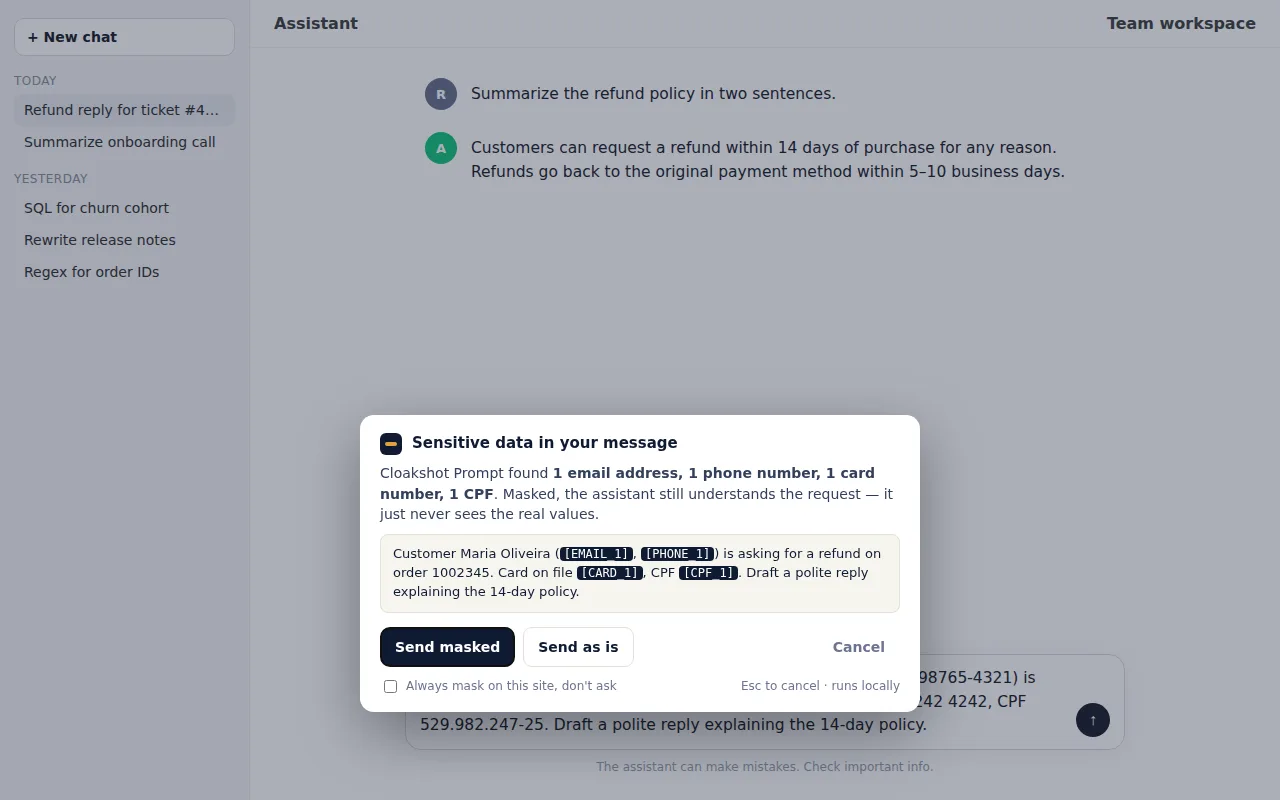
Paste or type as usual
When a paste or a message contains sensitive data, a small dialog lists what was found. Send masked, send as is, or cancel. Or switch a site to auto-mask and never see the dialog again.
![A chat where the user's message and the assistant's reply use placeholders like [EMAIL_1]](img/masked.webp)
The assistant answers with placeholders
Drafts, summaries, SQL, translations — the model does its job on the masked text. Placeholders are stable across the whole conversation.
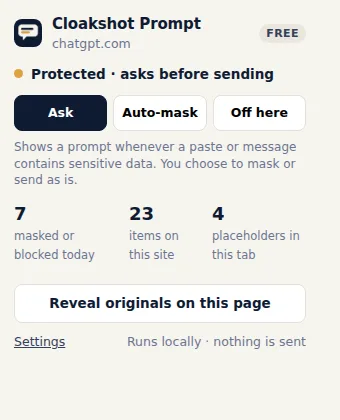
Get the originals back
Copy an answer and the placeholders turn back into real values, locally. Or click Reveal originals to restore the whole page. Counts of what was masked are kept for your records — never the content.
One policy for the whole team
Force-install the extension from the Google Admin console and push a policy: the protection mode, the words that must always be masked (client names, codenames), extra internal sites, and the license. Users can't turn it off. Every mask is counted per site and day, so compliance gets numbers instead of promises.
No proxy to deploy, no traffic to inspect, no server to host. It works with any Chrome-managed device in minutes. Read the admin guide →
{
  "mode": { "Value": "auto" },
  "lockSettings": { "Value": true },
  "keywords": { "Value": ["Acme Corp", "Project Falcon"] },
  "sites": { "Value": ["ai.acme.internal"] },
  "licenseKey": { "Value": "XXXX-XXXX-XXXX" }
}
Pricing
Free for individuals. Pro adds your own words and sites. Team adds the policy.
- All detectors, on the default AI chat sites
- Ask or auto-mask, per site
- Reversible placeholders in the tab
- Counts-only activity log
- Everything in Free
- Your own protected words and regex patterns
- Any site: internal AI tools, help desks, CRMs
- Activity export (CSV)
- 3 browsers · 14-day money-back guarantee
- Everything in Pro, for every seat
- Managed policy from the Google Admin console
- Locked settings, shared word lists and sites
- Invoice with your company details
- Billed yearly · $240 / year for 5 seats
More than 25 seats? Write to us.
Payments, invoices and taxes are handled by our payment provider (merchant of record). Prices in USD; local taxes may apply at checkout. Your license key arrives by email within a minute. Brazilian companies: write to us for an invoice in BRL with nota fiscal.
Questions
Which assistants are supported?
ChatGPT, Claude, Gemini, Copilot, Perplexity, DeepSeek, Le Chat (Mistral), Poe, Grok, Meta AI, Qwen and HuggingChat out of the box. Pro lets you add any other site — an internal AI tool, a help desk, a CRM.
Does the assistant still give good answers with placeholders?
For the vast majority of tasks, yes: drafting replies, summarizing, translating, writing SQL or code, extracting structure. The model needs to know that there is an email address and which one it is, not its letters. Where a real value matters (say, validating a specific IBAN), send as is — you decide each time, or per site.
Does anything leave my browser?
No. Detection and masking run inside the page. The placeholder map stays in the tab's memory. There are no analytics. The only network request the extension ever makes is license activation and a daily re-check when you use a Pro or Team key.
What if it misses something?
Detection is pattern-based, so it catches structured data (emails, numbers, keys) reliably and can't guess free-form context on its own. Add the names and codenames you care about to Always mask these words; each one becomes a [NAME_n] placeholder.
Can employees turn it off?
Individually, yes — it's their browser. With Team, the policy is pushed by your Chrome admin, the extension is force-installed and lockSettings removes the switches.
Firefox and Edge?
Edge and Brave install from the Chrome Web Store today. A Firefox version is planned.
Refunds?
14 days, no questions asked. Reply to your receipt email.